AI Instagram DM Booking Agent with a Slack Team Inbox
An AI front desk for Instagram, built in n8n. It answers DMs in seconds with real prices, checks Google Calendar and books appointments inside the chat, turns "PRICE" comments into conversations, and hands medical questions to a person. The team runs the whole inbox from Slack: every Instagram chat is a live thread they can reply in, with one-click buttons to take over, hand back to the bot, or cancel a booking.
- n8n (self-hosted)
- 11 workflows
- AI Agent with tools
- Claude Haiku 4.5
- Anthropic API
- Instagram API with Instagram Login
- Meta Webhooks
- Instagram Send API
- Quick replies
- Private replies
- Google Calendar API
- Google OAuth 2.0
- Slack Web API
- Slack Events API
- Slack Block Kit
- Slack Interactivity
- HMAC-SHA256 signature verification
- PostgreSQL
- SQL CTEs
- JavaScript
- Luxon
- Docker Compose
- ngrok
- Mock API test harness
How I framed it.
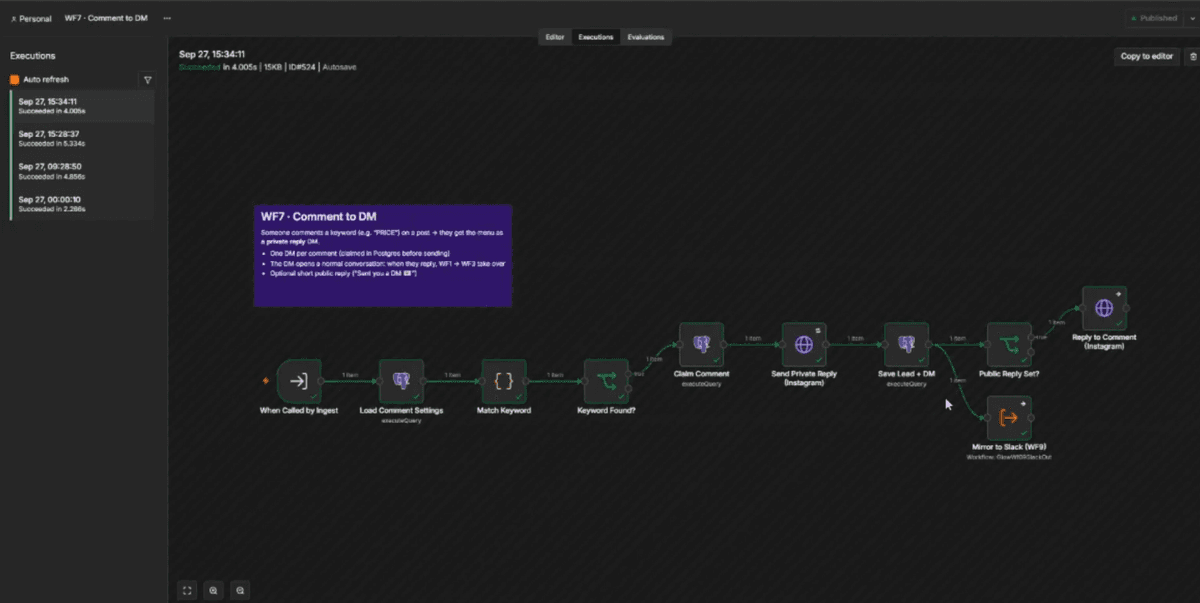
Clinics and salons get most of their leads in Instagram DMs, usually at night or while the team is busy, and a lead who waits books somewhere else. The team also juggles three places at once: the Instagram inbox, the calendar, and their own chat. I built a working system (demoed on a fictional med spa, running on real Instagram, Google and Slack accounts) where an AI assistant answers and books inside the DM, and the team supervises everything from Slack. The rule behind the design: the AI only decides what to say. Prices, available times, bookings, pausing and security are plain code and SQL, so the parts that cost money when they go wrong can't be hallucinated.
What it does.
- Answers every DM in about 10 to 20 seconds, day or night, in a friendly human tone
- Quotes prices, durations and policies only from the clinic's own price list and FAQs, never invented ones
- Checks live availability in Google Calendar and offers three real times as tap-to-reply buttons
- Books the appointment inside the chat and Google emails the customer a calendar invite with reminders
- Someone comments "PRICE" on a post: they get the price menu by DM and a public "Sent you a DM 💌" reply
- Medical questions, complaints, photos or "can I talk to a real person" go straight to the team, and the bot steps back
- The team answers customers from Slack; the reply arrives on Instagram as the clinic
- Quiet leads get a short follow-up that picks up where the chat left off, at most twice
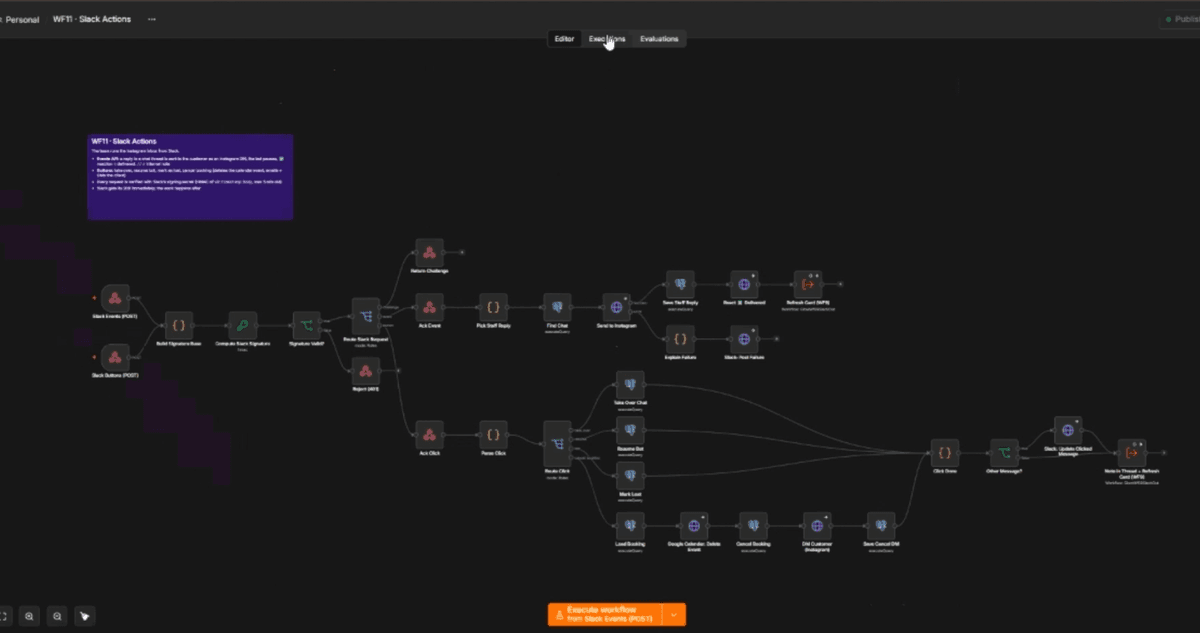
- Staff can cancel a booking from Slack in one click: calendar event removed, customer emailed and told by DM
How a message flows.
- 01Customer sends a DM
- 02Signature verified, 200 sent
- 03Duplicates dropped, burst merged
- 04Mirrored to the Slack thread
- 05AI agent picks its tools
- 06Prices and live times fetched
- 07Reply with time buttons
- 08Booked in Google Calendar
- 09Booking card posted to Slack
The Slack team inbox
One thread per Instagram chat
Every new customer gets a thread in the team channel. Their messages, the bot's replies (including the time buttons it offered), follow-ups, comments and staff replies all appear there as they happen.
Live status card
The thread starts with a card showing the customer's @username, name, stage, interest and email, and the current state: 🤖 Bot is answering, ✋ Team handling (and by whom), or ✅ Booked with the time. It updates itself after every change.
Reply from Slack, delivered to Instagram
A team member types in the thread and the customer receives it on Instagram from the clinic's account. A ✅ reaction confirms Instagram accepted it, and the bot pauses so it never talks over a person.
Internal notes
Messages starting with // stay in Slack, so the team can discuss a customer right next to the conversation without anything reaching them.
Handoff alerts with buttons
When the AI hands over, an alert is posted in the thread and broadcast to the channel with the reason and a one-line summary, plus buttons: ✋ I'll handle it, ▶️ Resume bot, Mark as lost.
Take over or hand back in one click
The card's buttons pause the bot for that customer or give the chat back to it. After a click the buttons disappear and the message shows who acted and when, in each viewer's own timezone.
Booking cards with Cancel
Every booking posts a card to a bookings channel: treatment, time, client, price, duration. Cancel booking asks for confirmation, then deletes the Google Calendar event (Google emails the client), tells the customer by DM with an offer to rebook, and updates the card.
Error alerts
If any workflow fails, a separate alert with the workflow, the failed step, the error and a link to the run is posted through a Slack webhook, so it arrives even if the bot token itself is broken.
Edge cases, handled
Three quick messages, one reply
People type "hi" / "how much" / "for lips" as separate messages. The system waits a few seconds and only the newest message claims the whole burst in one atomic SQL update, so the customer gets one reply that answers everything.
The same event delivered twice
Instagram message IDs are unique in the database and comments are claimed before replying, so a repeated webhook never produces a second reply or a second DM.
Two customers, one time slot
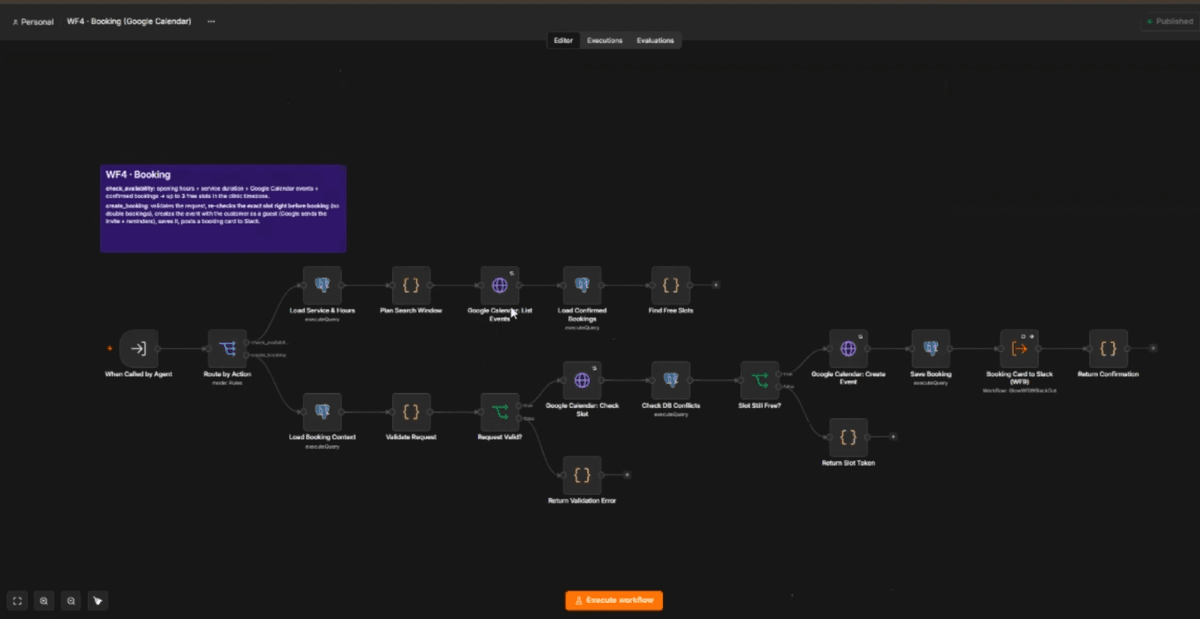
Right before booking, the exact slot is checked again against Google Calendar and confirmed bookings. If it was just taken, the AI apologises and offers new times.
Prices the AI can't make up
The model must call the price tool before stating any price, duration or policy. An unknown treatment returns the full menu with a note to suggest the free consultation instead of guessing.
Dates, hours and time zones
Opening hours, closed days, treatment length, minimum notice and the clinic's timezone are enforced in code. "Can I come Monday?" on a closed day gets the next open day, never an invalid slot.
Never talks over staff
Every message the bot sends is logged by its Instagram ID. When Instagram echoes a message the bot didn't send, a person replied from the Instagram app, so the bot pauses for that chat. Replies from Slack pause it too.
Medical and safety questions
Pregnancy, medications, allergies, reactions or "is it safe for me" are never answered by the AI. It sends a polite holding reply, pauses and alerts the team with a summary.
Photos, voice notes and story replies
Attachments the AI can't read are handed to the team; story replies are marked as such so the AI understands the context; tapped time buttons carry the exact slot back.
Prompt injection and off-topic requests
Customer messages are treated as content, not instructions. Requests to reveal the prompt or change role are ignored, discounts are never invented, and under-18s are politely refused.
Instagram's 24-hour rule
Follow-ups are only sent while the 24-hour messaging window is open. If a team member replies from Slack after it has closed, the thread shows "Not delivered" with the reason instead of failing silently.
Follow-ups that know when to stop
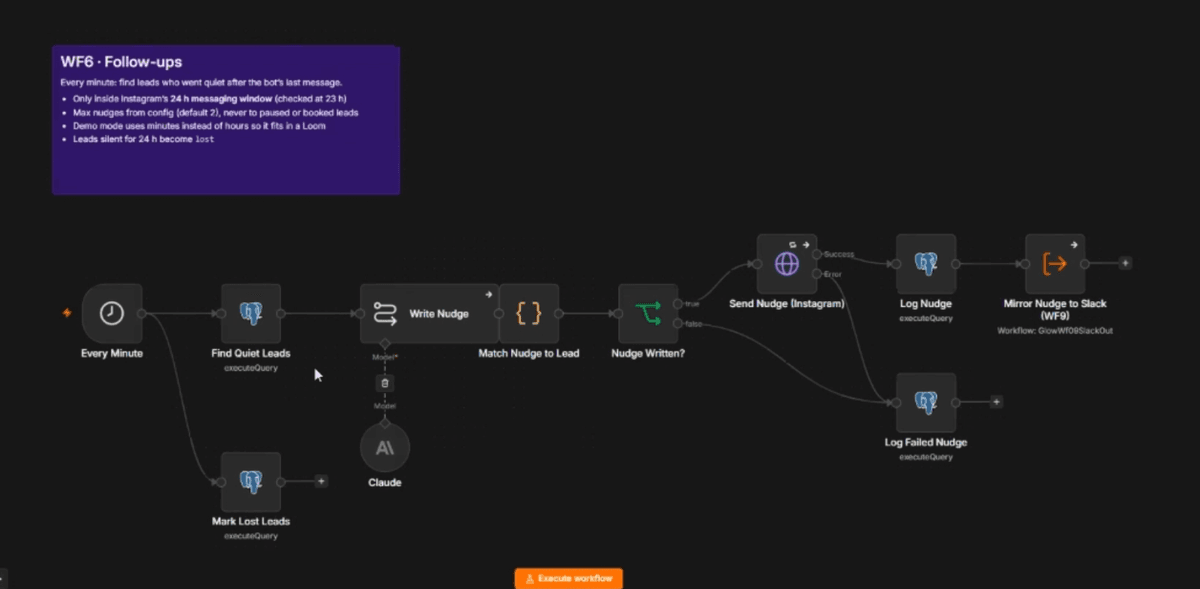
At most two, never to booked, paused or lost leads, and a failed attempt still counts, so an outage can't cause a retry storm. Leads silent for 24 hours are marked lost.
The AI or Google is down
If the agent fails, the customer still gets a polite "a team member will reply shortly" and the team is alerted. Every failure is logged with the failed step.
Forged or replayed requests
Instagram webhooks are verified with HMAC-SHA256 over the raw body; Slack requests with the signing secret and a five-minute replay window. Invalid requests are rejected before any work happens.
Slack problems never block customers
Slack runs beside the Instagram flow, not in its way. If Slack is slow or misconfigured, customers are still answered and the error is reported.
Someone clears the Slack channel
Before posting, the status card is refreshed. If Slack says it was deleted (or the channel changed), a fresh thread starts automatically instead of posting into nowhere.
The team forgets to hand back
A paused chat resumes automatically after 12 quiet hours, a booking survives a handoff, and clicking Cancel twice does nothing the second time.
The 11 workflows
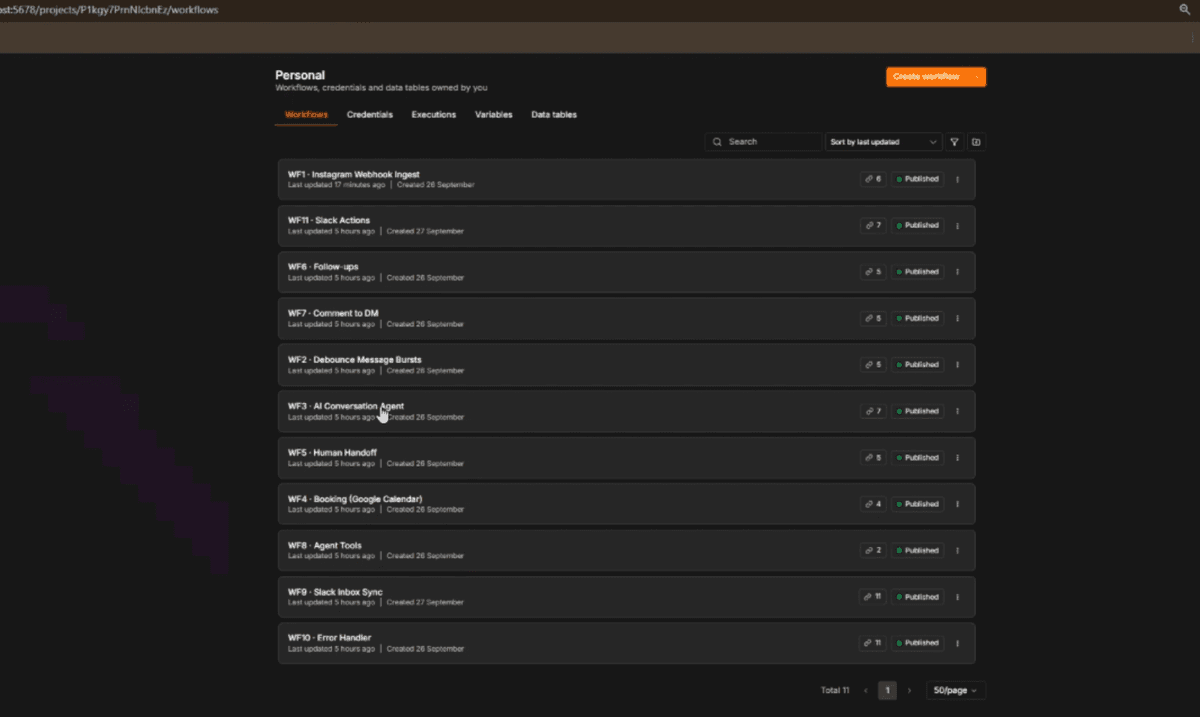
WF1 · Instagram Webhook Ingest
Meta's verification handshake, signature check on the raw body, instant 200, splits batched events, drops duplicates and routes customer DMs, staff echoes and comments.
WF2 · Debounce Message Bursts
Waits for more messages, claims the burst atomically, mirrors it to Slack, then runs the agent once.
WF3 · AI Conversation Agent
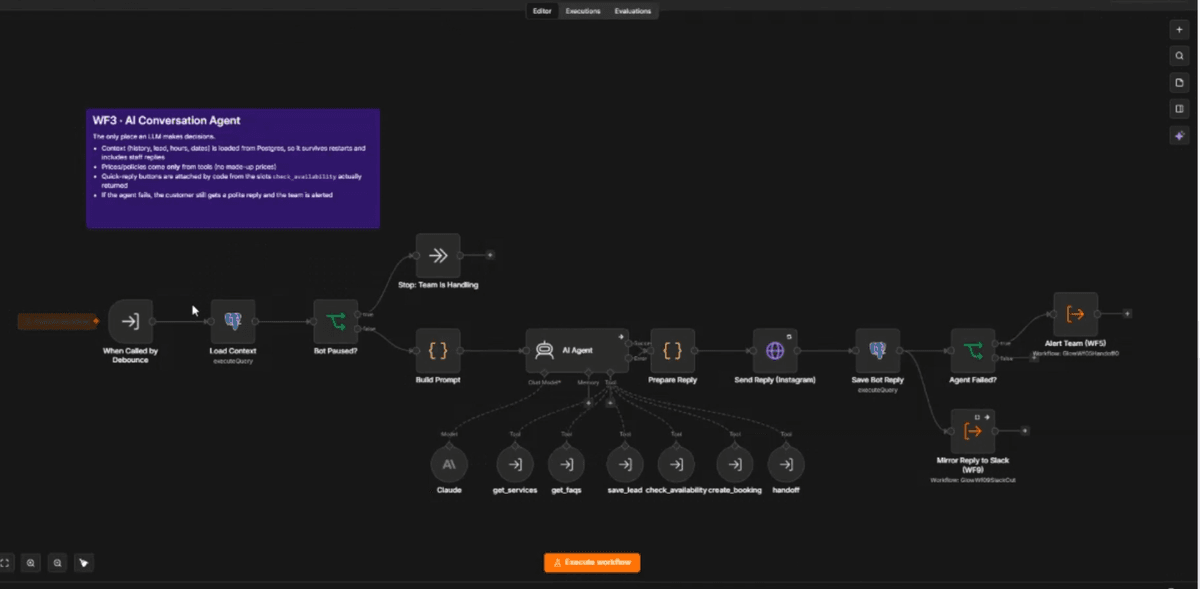
Loads context, stops if the team is handling the chat, runs Claude with its 6 tools, attaches time buttons, sends, logs, and falls back gracefully if the AI fails.
WF4 · Booking (Google Calendar)
check_availability finds free slots from hours, duration and calendar events; create_booking validates, re-checks the slot, creates the event with an invite, saves it and posts the booking card.
WF5 · Human Handoff
Pauses the bot and alerts the team, detects staff replies from the Instagram app, secure resume links as a fallback, and a check every 30 minutes that resumes chats left paused for 12 hours.
WF6 · Follow-ups
Every minute: finds quiet leads inside the 24-hour window, has Claude write a short nudge from the recent chat, sends it and marks lost leads.
WF7 · Comment to DM
Keyword match on comments, one private DM per comment, optional public reply, and the new lead mirrored to Slack.
WF8 · Agent Tools
Price lookup with fuzzy alias matching ("lips" finds lip filler), FAQ lookup by topic, and lead updates with email validation.
WF9 · Slack Inbox Sync
Instagram to Slack: creates the thread and status card, refreshes it, mirrors every message, posts handoff alerts and booking cards, and heals deleted threads.
WF10 · Error Handler
Attached to every workflow: logs the failure and posts a Slack alert with a link to the failed run.
WF11 · Slack Actions
Slack to Instagram: verifies every request, sends thread replies as DMs with a delivered reaction, and runs the buttons (take over, resume, mark lost, cancel booking).
Inside the build.
One AI agent inside fixed workflows
Only one step uses an LLM. Everything around it (webhook security, batching, booking, pausing, follow-up rules) is deterministic, so behaviour is predictable and testable. The agent chooses which tool to call and how to phrase the answer, nothing else.
Buttons come from code, not the model
The time buttons under a reply are attached by code from the slots check_availability actually returned, and only for times the reply mentions. The model can't offer a slot that doesn't exist.
The database is the single source of truth
History, pause state, bookings and Slack thread IDs all live in Postgres. The agent reads history from there instead of a memory node, so staff replies and follow-ups are part of the context and nothing is lost on restart. Slack is only a view that is rebuilt from the data.
Idempotent from the first webhook
Meta and Slack both retry and batch. Every Instagram message is stored under its unique ID, every comment is claimed before replying, Slack retries are ignored and Slack messages are de-duplicated by timestamp, so nothing is answered twice.
Workflows as code
The 11 workflows are generated from a builder script with fixed IDs, so sub-workflow calls survive re-imports, and setup scripts create credentials, import and publish everything in dependency order with one command.
Runs on a laptop or a server
Docker Compose (Postgres, n8n, ngrok) for servers, plus a no-Docker local mode (n8n from npm, an embedded Postgres engine saved to disk, ngrok) that starts with one command. The same workflows run in both.
Under the hood.
- 11 n8n workflows, 165 nodes, self-hosted n8n 2.40 with an error workflow attached to every workflow
- One LangChain AI Agent node on Claude Haiku 4.5 with 6 tools, each a typed sub-workflow: get_services, get_faqs, save_lead, check_availability, create_booking, handoff
- Conversation history, customer facts, opening hours and a 14-day date table are loaded from Postgres into the prompt, so the model never does date math
- Instagram API with Instagram Login: webhooks with raw-body HMAC-SHA256 verification, Send API with quick replies, private replies to comments, the user profile API for @usernames
- Google Calendar API over OAuth 2.0: busy times from events, event creation with the customer as attendee and sendUpdates, deletion with cancellation emails
- Slack Web API (chat.postMessage, chat.update, reactions.add), Block Kit cards and confirm dialogs, Events API and interactivity, all verified with the Slack signing secret
- Postgres schema with unique Instagram message IDs for idempotency, an atomic UPDATE ... RETURNING burst claim, and an events table that records every handoff, booking, reply and error
- Timezone-aware slot finder in Luxon: opening hours, treatment length, slot step, minimum notice and booking horizon
- Workflows are generated from a JavaScript builder with fixed IDs, and a local harness runs the real n8n and Postgres against mocked Instagram, Google, Slack and Claude: 57 automated regression checks
The toolkit.
n8n
11 workflows: webhooks, sub-workflows, AI agent, schedules, error handling
Claude (Anthropic)
The conversation agent and the follow-up writer
Instagram API
DM webhooks, replies with buttons, comment private replies, profiles
Google Calendar API
Live availability, bookings with invites, cancellations
Slack API
Threads, Block Kit cards, buttons, events, reactions, alerts
PostgreSQL
Leads, messages, bookings, audit events, idempotency, stats
What I learned.
- Keep the AI on language and let code own the numbers. Prices, times and bookings coming only from tools is what makes an AI front desk safe to put in front of customers.
- Webhooks arrive twice, in bursts and out of order. Designing for idempotency from the first node was cheaper than fixing double replies later.
- Treat chat tools as a view, not a database. Rebuilding the Slack card from Postgres every time made the inbox self-healing, even when someone deletes messages.
- A mock harness that runs the real n8n pays for itself: 57 checks caught ordering and data bugs before a single real customer message.